
If you’ve been looking into the EDGE green building certification, either because you’re studying to be an EDGE Auditor or you’re a developer looking to apply for a building certification, you’ve probably come across the window to wall ratio, often abbreviated as WWR in the EDGE certification documents.
Window to Wall Ratio in EDGE is a pretty simple concept, but it’s got some considerations that do confuse people. So, let’s look into the subject a bit.
If you’re looking for EDGE Auditor services, head over to EA’s website. They’re a group of professionals who provide EDGE auditor and expert services.
Why Window to Wall Ratio is important in EDGE
Windows are usually the weakest link when it comes to energy loss in a building. Typically glass conducts heat pretty well: touch a window versus a wall on a cold day, you’ll notice the glass is significantly colder. Exterior walls typically have U values of 0.5 – 2.5 W/m2C. Your regular solid brick wall, which tends to be on a crappy side insulation-wise, does about 2.2 W/m2C. Remember with U values, the lower the value the less heat is transferred by the material.
How’s glass work out in U calculations? Your average window, single glazed, is around 5.0 W/m2C, or 6.0 if it has a metal frame. That means your windows are letting almost twice the energy through than your walls are. See? The window is the weakest link energy-wise in a building.
And that’s why the EDGE methodology favors buildings with less window area. Less window area means less internal heating during the warmer months, which translates to lower air conditioning requirements.
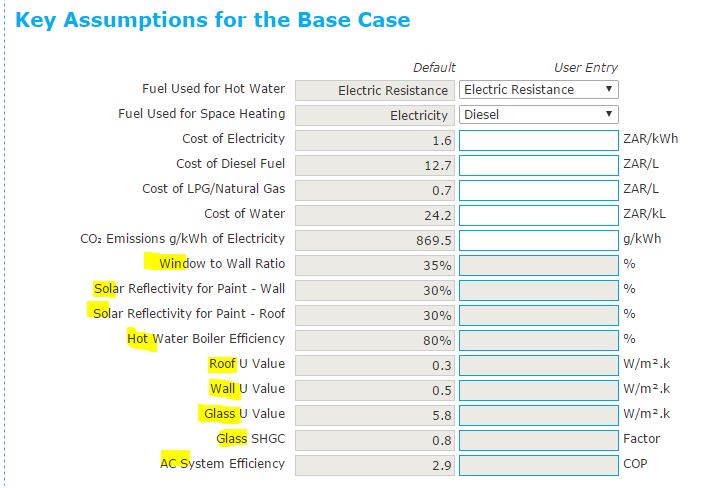
What WWR you should aim for, depends on your part of the world and EDGE baselines. Check the design section under «Key assumptions for base case». There you’ll see what WWR, U values and other parameters you have to meet in order to start seeing improvements towards your 20% energy reduction. You’ll notice several of these boxes are greyed out, that’s because they’re determined by the EDGE buildings model for your particular location, and you can’t alter them:
Window to Wall Ratio formula
Ok, so the EDGE app has a calculator built in to help you calculate Window to Wall Ratio. But that’s really not much help if you don’t know the details behind the WWR! What’s Window to Wall Ratio?
Let’s start by checking the user guide, any of the building type guides will do. Window to Wall Ratio is calculated using the following formula:

You simply divide the total glazing (window) area by the total wall area. That’s your EDGE window-to-wall ratio. Not much to it math-wise.
But, be careful! There’s some considerations you need to take into account.
What’s «gross exterior wall area»?
«Gross exterior wall area», when it comes to calculating your WWR, is the total area of walls that separate the outside from the inside of the building. Viewed in a technical way, it’s the total area of walls that might develop a temperature differential on them, because there’s cold air on one side, and warm air on the other.
You need to take into account the entire exterior wall area, not just the area for facades that have windows on them. That’s a really common mistake: people take into account only walls which have windows on them and ignore solid exterior walls: which is wrong. That’s going to push your WWR higher, and could bomb your chances of meeting the required value.
It doesn’t matter if an exterior wall has windows or not, it’s an exterior wall, and it gets added to the gross exterior wall area. The only exceptions are the ones that I outline below, in the section «Any other walls I should ignore?».
What’s considered «window» or «glazing area»?
A glazed area is the area that’s got glass on it, AND the frames and mullions that hold it together. It’s the total area of a window, not just the glass, you don’t have to subtract the frames from it. There’s some codes that require you to subtract mullions and frames from a window for WWR, but not EDGE. In EDGE the whole window counts, at least for energy calculations.
And it doesn’t matter if it’s a fixed window, a curtain wall, an operable window, or a glass door… it’s all glazing area.
The only exception to the rule is if you’re dealing with an insulated spandrel glass panel. Knowing I probably lost you on that last term, an insulated spandrel glass panel is this:

See those 3 horizontal black stripes on the window? Those are insulated spandrel panels. Up close they look something like this:

See? Even though it’s got glass, and it looks like glass, it doesn’t behave like a glass panel. The foam on the inside keeps the heat from going through, and makes the panel behave more like a wall energy-wise. That’s why insulated spandrel panels don’t count as glazing area: the heat’s not going anywhere via that panel.
If you have that kind of panels, you don’t count them as glazing area. They just count towards the gross wall area. That’s something you’ve gotta watch out for: just because you see a curtain wall doesn’t mean it’s all glazing area. You’ve gotta check to see there’s no insulated panels in there. Have the developer submit their curtain wall design to be sure!
What about louvers, screens, and windows that don’t face the street/outside?
For something to count as glazing area, it has to have glass on it. Louvers by themselves don’t count as glazing area since they don’t have glass. Mesh screens don’t count either if it’s just a screen over an opening. No glass? Doesn’t count as glazing (but it does count as wall area!).
Windows and walls that face internal courtyards DO count. Many people think that only exterior facade walls count, but interior courtyards/gardens also count towards WWR as long as they’re open to outside air. If it’s open to outside air, you’re going to have a temperature gradient on that wall, and it’s going to affect your energy efficiency.
I’m going to split a few hairs on this last one, just for the sake of argument. If you have something like this:

That counts. You need to add those glass panels and the walls into your WWR calculation. See the sky? That space is open to the outside air = temperature gradient, etc.
Something like this, on the other hand, might not count:

If that garden is internal, not open to outside air, and it’s just for letting light in (say there’s a zenital window above it), it doesn’t count. Of course you’d have to look at the design drawings in order to determine whether it’s internal or not. That’s part of the design audit.
Any other walls I should ignore?
Yes. The EDGE user guide lists several other cases where you should not take walls into consideration for your WWR:
- Walls with windows into unconditioned, enclosed spaces. The keyword there is «enclosed». For example a window that looks into a closed garage in a home, or a window looking into a factory floor should not be counted, neither the window nor the wall.
- Walls with only ventilation openings, with no glazing. Keyword here is «no glazing». A wall with a bunch of holes in it should be ignored, but if a single one of those openings has a glass panel, it counts.
- Walls with windows and openings facing interior shafts. The guide mentions bathroom shafts in India, so we’re probably talking about a small ventilation shaft, meant to provide a way out for moist air from the bathroom and avoid sending it into the apartment. Since it’s meant to take air out, is small and spans several floors vertically, it’s not likely to cause much of a temperature gradient.
- External walls not directly exposed to the environment. A basement wall which is underground, or a wall that’s in direct contact with another building, doesn’t count.
You also need to keep in mind that the walls that get counted are those that separate the interior from the exterior of the building. Take a look at this one:

See those wall segments marked in yellow? They don’t count. The two on the sides are outside walls, there’s outside air on both sides. The center one is an inside wall: inside air on both sides. The rest of the facade walls, they count.
What walls count towards gross exterior area?
Like I said before, the walls that count towards the gross exterior wall area are those that separate the inside of a building from the outside. In other words, on one side of the wall you have the internal conditioned space, on the other side you’ve got the outside. Those are the walls you need to tally in your gross exterior area. Exceptions? Those I outlined on in the previous sections.
Window to Wall Ratio for individual units in a building
Here’s a real common beginner pitfall when calculating window to wall ratio (click the image to make it bigger).
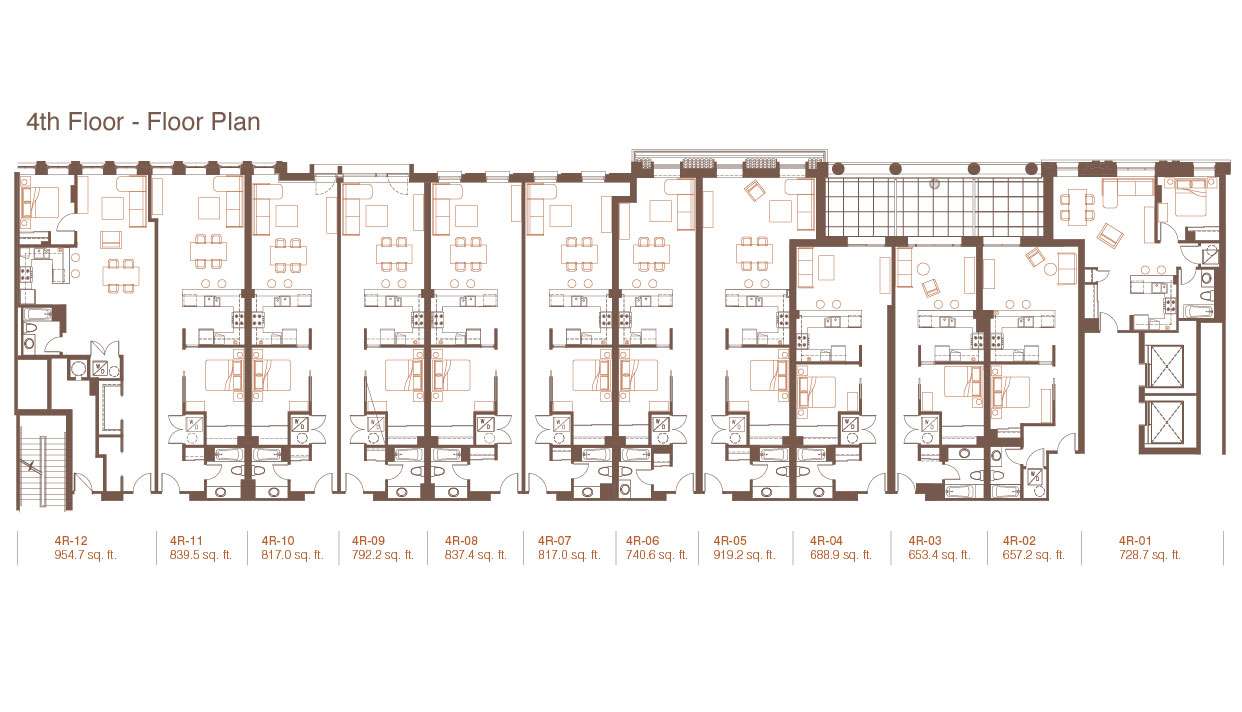
In a residential building, EDGE certifies each unit separately. Each apartment gets its own evaluation. Say you’re calculating WWR for apartment 4R-09. 4R-09 is sandwiched between two other apartments and has a pretty big balcony window.
Someone who’s just getting to know EDGE would do something like this: side walls don’t count since they’re interior, rear wall doesn’t either for the same reason. The only wall that counts in the one facing the balcony. And so they’d calculate that apartment’s wall area, that apartment’s window area… and get a whopper of a WWR, probably well over 70%. Do the same for the other units, probably not a single one will meet the 30% WWR target and your 20% energy requirement (and certification!) goes down the drain!
So, does that mean the building can’t be certified EDGE? No, it means you’re going about it wrong.
Window to wall ratio is a global measurement in a building. That means there’s generally only one WWR for the whole building, there’s no WWR for each individual unit within the building. Energy-wise, the building envelope is one big surface, and it’s going to transfer heat as a whole. So as far as EDGE is concerned, you have to calculate WWR for the entire building, not individual units. Then, one can assume heat transfer will average out over all units… remember EDGE is not a detailed design tool and is quasi-steady-state, you can make that kind of an assumption without any awful effects on your final result.
When you calculate the window to wall ratio for the entire building, it’s going to be a whole lot less, and you’ll probably reach your WWR target.
Splitting hairs once more, I guess if you had a building where there’s a radical change in facades at some point, say a regular concrete tower with a huge curtain wall only on the top levels, you might have some trouble with the assumption things will just average out. In that case you could probably do a separate WWR analysis for each facade type and assign different WWR values to affected units. And where the WWR ratio can’t be lowered, using Low-E glass might be an option to get the energy usage under control.
That’s how you calculate Window to Wall Ratio in EDGE
So that’s it. That’s how the window to wall ratio works in the EDGE methodology. As you can see, the base formula is pretty simple, but you need to get a grasp on the concepts behind it in order to fully understand what you’re supposed to put into the equation.
As for the WWR calculator in the EDGE app, nothing real special about it. Just input the different areas into their corresponding places and you get your WWR. Then copy that value onto your EDGE analysis sheet.
Remember: EDGE methodology and its tools are subject to change at any time, and calculation results will depend on your local EDGE baseline parameters. This post is not meant to replace any of the EDGE user guides. If the guides say something different from what is said here, they’re right, and I’m wrong.